
Skip to content
Anexet

Microsoft Outlook Email Interception

Outlook is the most widely deployed corporate mail client, and one of the most common ways files leave. Desktop and web are both captured.

Schedule a Demo
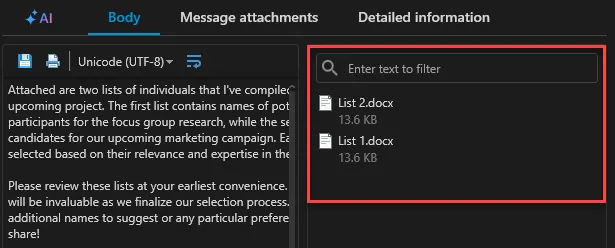
Anexet Client Console showing intercepted Outlook messages and attachments

Why Outlook Needs Endpoint Coverage

Outlook carries the bulk of corporate mail — and with it, contracts, client data, and intellectual property that can leave in a single forward.

A document quietly forwarded to a personal address, a message headed for a competitor, a side account on Bcc — Outlook makes each of these effortless, and a mail gateway alone won't catch every path a message can take out.

Anexet covers both surfaces where Outlook runs: the desktop client on managed Windows workstations, intercepted at the MAPI layer, and Outlook on the web in the browser. Capture happens at the endpoint, so there's nothing to route or redirect — every message becomes a searchable record the moment it's sent or received.

The risk, at a glance

  • The default mail client

    Outlook carries most of a company's day-to-day correspondence, making it a high-value channel to protect.

  • Easy to redirect

    A forward, a Bcc, or an auto-rule can quietly send a message somewhere it shouldn't go.

  • Desktop and web, both in scope

    Outlook on the web is just as easy to use for a risky send as the desktop client — both need the same coverage.

Track, Intercept, Block — in One Agent

Everything you need to bring Outlook under control, included as your plan grows.

  • Tracking

    See Outlook usage and mail volume per employee, feeding straight into employee-monitoring and productivity reports.

  • Interception

    Capture sender, recipients, subject, body, and every attachment — from the desktop client via MAPI and from Outlook on the web — searchable in the Client Console.

  • Blocking

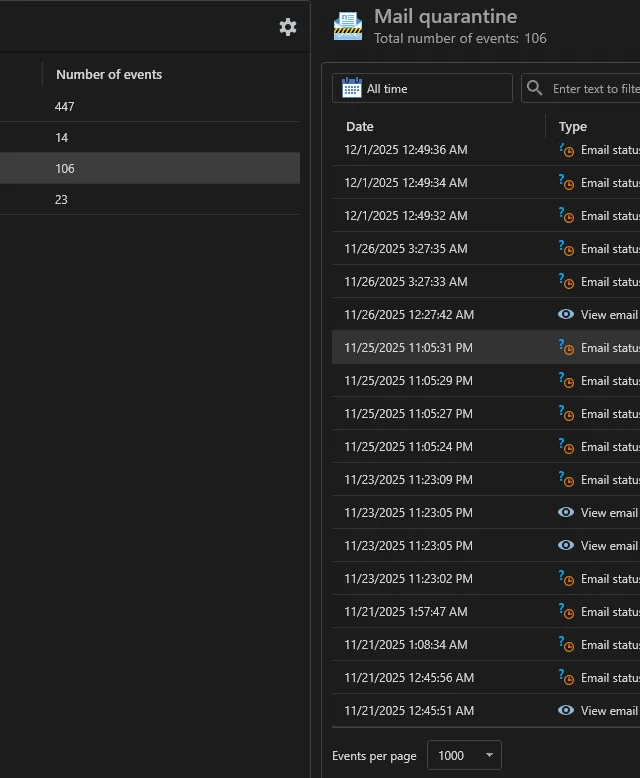
    Stop risky sends with SMTP and MAPI blocking rules, with SMTP-blocked messages held in Mail Quarantine (Advanced); content-aware blocking by digital fingerprint or sensitivity label keeps confidential documents in (Premium).

What Anexet Captures in Outlook

Anexet records every Outlook message on a managed workstation: sender, all recipients (To, Cc, Bcc), subject, body, and attachments, tied to the user identity and an exact timestamp — captured the same way in the desktop client and in Outlook on the web.

Because the desktop client is intercepted at the MAPI layer and web sessions through the browser channel, there's no mail gateway to configure and no change to how employees use Outlook. From the Advanced plan, matching sends are blocked, and messages stopped by SMTP rules are held in Mail Quarantine; with Premium, content-aware rules block by fingerprint or sensitivity label regardless of how a file is renamed.

Intercepted Outlook messages and attachments in the Anexet Client Console
Mail Quarantine log listing blocked messages and review actions

How Outlook Control Works

From an Outlook message on the endpoint to a controlled, searchable record.

A lightweight agent on the Windows workstation intercepts Outlook desktop traffic at the MAPI layer and captures Outlook on the web through the browser channel.

1

Captured messages, recipients, and attachments are sent to your on-premises server and indexed for full-text search.

2

Security policies scan each message in real time and can block the send or, for messages matched by SMTP rules, route it to Mail Quarantine.

3

Security officers review blocked and quarantined mail and either release it for delivery or confirm the block, and analysts export the full Outlook history from the Client Console for internal investigations.

4

A lightweight agent on the Windows workstation intercepts Outlook desktop traffic at the MAPI layer and captures Outlook on the web through the browser channel.

1

Captured messages, recipients, and attachments are sent to your on-premises server and indexed for full-text search.

2

Security policies scan each message in real time and can block the send or, for messages matched by SMTP rules, route it to Mail Quarantine.

3

Security officers review blocked and quarantined mail and either release it for delivery or confirm the block, and analysts export the full Outlook history from the Client Console for internal investigations.

4

Arrow

Outlook Control by Plan

StandardCore employee activity monitoring.
Network traffic interception
USB control
Printer monitoring
Messenger interception
Browser interception
and 4 more
Most popular
AdvancedAdds DLP and deeper visibility.
Standard plan included
DLP features
Network share monitoring
Keylogger
Webcam pictures
and 4 more
All-in-one
PremiumAll-in-one solution.
Standard + Advanced plans included
Advanced search (digital fingerprints, hash search)
File system monitoring
User relationship analysis
Risk analysis
and 6 more

Frequently Asked Questions

Common questions about how Anexet handles Microsoft Outlook.

Does Anexet capture both Outlook desktop and Outlook on the web?

Yes. The desktop client on Windows is captured at the MAPI layer, and Outlook on the web is captured through the browser channel on the same managed endpoint. Both surfaces are covered from the Standard plan.

Send blocking and Mail Quarantine are part of the Advanced plan. Content-aware blocking by digital fingerprint or sensitivity label — stopping a specific document regardless of the message text — is part of Premium.

Yes. On a managed Windows endpoint, Outlook desktop connected to Microsoft 365 (Exchange Online) is captured the same way as any other Exchange account, with the encrypted-mail option enabled for cloud traffic. For mailboxes on devices without an agent, Anexet also offers an agentless Microsoft 365 cloud connector — plan coverage and setup details for your environment are confirmed during the demo.

Never. Anexet is deployed on-premises: all captured Outlook messages and attachments stay inside your infrastructure, and the vendor has no access to your data.

Outlook coverage focuses on the desktop client and Outlook on the web on managed Windows workstations. Anexet doesn't ship mobile agents, so Outlook apps on phones and tablets fall outside that scope.

Three professionals collaborating and looking at a tablet in a meeting

Bring Outlook Under Control

Tell us how your teams use Outlook and what you need to protect — we'll map it to the right plan and arrange a demo or a free trial of Anexet Ultimate.

I accept that my personal data can be processed in accordance with the Privacy Policy