

Microsoft 365 Email Interception

Not every device running Microsoft 365 mail carries a desktop agent — remote users, contractors, and cloud-first teams still need coverage. Anexet's Microsoft 365 connector intercepts and monitors mail directly from your Exchange Online tenant, with no agent deployed on any endpoint, and stores it on your own on-premise server, where the vendor has no access to it.

Schedule a Demo
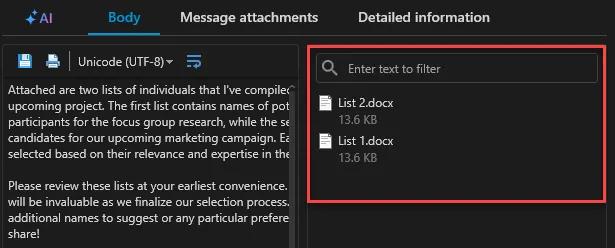
Anexet Client Console showing intercepted Microsoft 365 mail

Why Microsoft 365 Needs a Cloud-Level View

Microsoft 365 mail moves with the organization — including to devices where a desktop agent isn't installed.

Endpoint agents give deep, protocol-level coverage of Outlook and Exchange wherever they're installed. But cloud-hosted Exchange Online accounts are also reached from devices outside that footprint, leaving a gap for organizations that want mail coverage regardless of the endpoint.

Anexet closes that gap with its Microsoft 365 connector: it connects directly to your Exchange Online tenant and intercepts mail with no agent deployed on any endpoint. It's a complementary path to endpoint-level MAPI capture on Outlook, not a replacement for it.

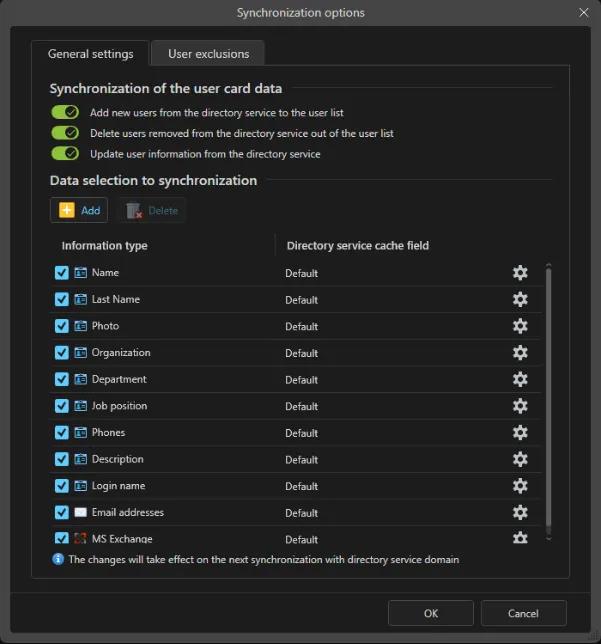
The same tenant connection can sync with Microsoft Entra ID, so user profiles from your cloud directory carry over automatically into Anexet — see Active Directory Integration for how directory sync works across on-premise AD and Entra ID.

The risk, at a glance

  • Cloud-first mail, cloud-level gaps

    Exchange Online accounts are reachable from any device, including ones without an endpoint agent.

  • No agent, no rollout delay

    The connector covers a tenant's mail without waiting on a device-by-device agent deployment.

  • A companion, not a substitute

    The connector complements endpoint-level Outlook capture for organizations that want both layers.

Track, Intercept, Block — in One Platform

Everything you need to bring Microsoft 365 mail under control, included as your plan grows.

  • Tracking

    See Microsoft 365 mail volume and usage per employee, feeding straight into employee-monitoring and productivity reports.

  • Interception

    Intercept and monitor Microsoft 365 mail through the connector, with no agent on any endpoint, searchable in the Client Console alongside endpoint-captured mail.

  • Blocking

    Stop risky sends where the endpoint agent runs: SMTP/MAPI security policies, Mail Quarantine, and content-aware blocking by digital fingerprint or sensitivity label.

What Anexet Captures via the Microsoft 365 Cloud Connector

The Microsoft 365 connector intercepts and monitors mail directly from Exchange Online, so an organization gets a searchable mail record with no agent deployed on any endpoint.

The connector is part of the Premium plan and focuses on mail interception: it builds the searchable record, while send blocking and Mail Quarantine remain endpoint-level controls on managed devices. Where the connector's mail depth needs to line up with a specific Exchange Online setup, we walk through it during the demo.

Intercepted Microsoft 365 mail in the Anexet Client Console
User activity timeline tied to Microsoft 365 mail events

How Microsoft 365 Control Works

From a Microsoft 365 mailbox to a controlled, searchable record.

The Microsoft 365 connector is configured against your Exchange Online tenant, with no agent installed on any endpoint.

1

Intercepted mail is sent to your on-premise Anexet server and indexed for full-text search alongside endpoint-captured mail.

2

On managed devices, the endpoint agent adds Outlook-level capture and Security Policies for send blocking and Mail Quarantine.

3

Analysts search the combined mail record in the Client Console and export it as court-grade evidence.

4

The Microsoft 365 connector is configured against your Exchange Online tenant, with no agent installed on any endpoint.

1

Intercepted mail is sent to your on-premise Anexet server and indexed for full-text search alongside endpoint-captured mail.

2

On managed devices, the endpoint agent adds Outlook-level capture and Security Policies for send blocking and Mail Quarantine.

3

Analysts search the combined mail record in the Client Console and export it as court-grade evidence.

4

Arrow

Microsoft 365 Control by Plan

StandardCore employee activity monitoring.
Network traffic interception
USB control
Printers monitoring
Messengers interception
Browsers interception
and 4 more
Most popular
AdvancedAdds DLP and deeper visibility.
Standard plan included
DLP features
Network shares monitoring
Keylogger
Webcam pictures
and 4 more
All-in-one
PremiumAll-in-one solution.
Standard + Advanced plans included
Advanced search (digital fingerprints, hash search)
File systems monitoring
User relations analysis
Risk analysis
and 6 more

Frequently Asked Questions

Common questions about how Anexet handles Microsoft 365.

Do I need a desktop agent for Microsoft 365 mail capture?

No. The Microsoft 365 connector connects directly to your Exchange Online tenant to intercept and monitor mail with no agent deployed on any endpoint. It works alongside endpoint-level Outlook capture (via MAPI) on devices that do have the agent.

The Microsoft 365 connector is part of the Premium plan. Endpoint-level Outlook capture for Microsoft 365 accounts on managed Windows devices is available from Standard.

Send blocking, Mail Quarantine, and content-aware policies apply to endpoint-captured mail on managed devices. The connector itself focuses on tenant-level mail interception and monitoring; how deep that capture reaches for your specific Exchange Online setup is something we confirm together during the demo.

Never. Anexet is deployed on-premise: intercepted Microsoft 365 mail is stored inside your infrastructure, and the vendor has no access to your data.

No. Anexet has no mobile agents. Coverage applies to managed Windows, Linux, and macOS workstations plus the Microsoft 365 connector at the tenant level.

Yes. The same Microsoft 365 tenant connection integrates with Microsoft Entra ID, syncing user profiles automatically for cloud-based environments — see Active Directory Integration for the full directory-sync picture, including on-premise Active Directory.

Three professionals collaborating and looking at a tablet in a meeting

Bring Microsoft 365 Mail Under Control

Tell us how your organization uses Microsoft 365 and what you need to protect — we'll map it to the right plan and arrange a demo or a free trial of Anexet Ultimate.

I accept that my personal data can be processed in accordance with the Privacy Policy