Skip to content
Anexet

Gmail Interception

Gmail follows employees to work — personal inboxes and the browser tab both move files out. It is captured on the endpoint, and risky sends are blocked.

Schedule a Demo
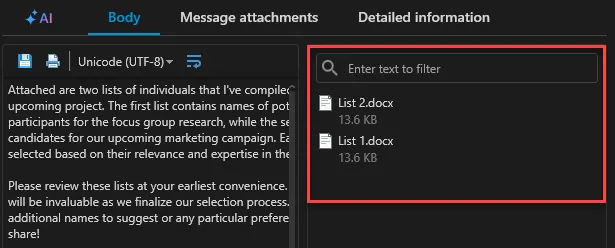
Anexet Client Console showing intercepted Gmail messages and attachments

Why Gmail Needs Endpoint Coverage

Gmail is the world's most-used inbox, and it slips into the workplace through both personal accounts and Google Workspace.

A confidential file attached to a personal Gmail message, a client list forwarded from a Workspace account, or a quick browser session at mail.google.com — every one of these routes bypasses network-only tools that never see inside an encrypted webmail session.

Anexet captures Gmail at the endpoint instead: IMAP and SMTP traffic on the workstation, plus the browser session when an employee opens mail.google.com. Corporate Google Workspace and personal Gmail accounts are covered the same way, with no gateway, proxy, or Google API integration required.

The risk, at a glance

  • Two accounts, one blind spot

    Personal Gmail and corporate Workspace mail both run through the same browser tab, unseen by perimeter tools.

  • A familiar habit

    Employees treat Gmail as routine, which makes it an easy, low-friction way to move a file out.

  • Invisible on the wire

    Webmail traffic is encrypted in transit — only endpoint capture actually sees the message and its attachments.

Track, Intercept, Block — in One Agent

Everything you need to bring Gmail under control, included as your plan grows.

  • Tracking

    See who uses Gmail, how often, and from which account. Activity feeds straight into employee-monitoring and productivity reports.

  • Interception

    Capture message bodies, senders, recipients, and every attachment — via IMAP/SMTP and the mail.google.com browser channel — searchable in the Client Console.

  • Blocking

    Stop risky sends with security policies — SMTP rules with Mail Quarantine, HTTP(S) rules for the browser channel (Advanced); content-aware blocking by digital fingerprint, hash, or sensitivity label keeps confidential documents in (Premium).

What Anexet Captures in Gmail

Anexet records every Gmail message on a managed workstation as the user sends and receives it: sender, To/Cc/Bcc recipients, subject, body, and attachments, all indexed with the user identity and timestamp attached.

Because capture runs on the endpoint through IMAP/SMTP and the browser channel, personal Gmail and Google Workspace accounts are covered the same way — no Google API access or Workspace admin changes needed. From the Advanced plan, SMTP rules block a matching send and route it to Mail Quarantine, and HTTP(S) rules cover sends from the browser; with Premium, content-aware rules block by fingerprint, hash, or sensitivity label.

Intercepted Gmail messages and attachments in the Anexet Client Console
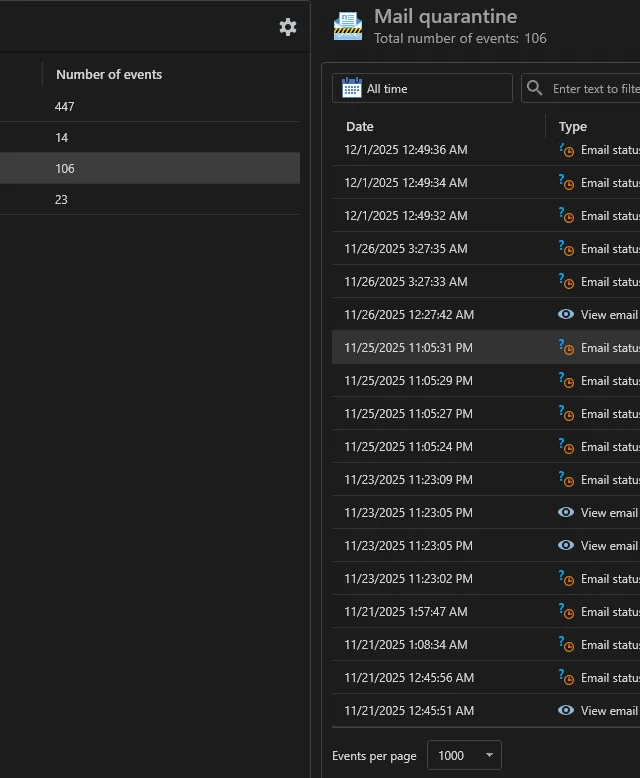
Mail Quarantine log listing blocked messages and review actions

How Gmail Control Works

From a Gmail message on the endpoint to a controlled, searchable record.

A lightweight agent on the workstation captures Gmail traffic at the IMAP/SMTP protocol layer and through the mail.google.com browser session.

1

Captured messages, recipients, and attachments are sent to your on-premises server and indexed for full-text search.

2

From the Advanced plan, security policies scan each message in real time and can block the send or, for messages matched by SMTP rules, route it to Mail Quarantine.

3

Security officers review quarantined mail and either release it for delivery or confirm the block, and analysts export the full Gmail history from the Client Console as a complete, timestamped record for internal investigations.

4

A lightweight agent on the workstation captures Gmail traffic at the IMAP/SMTP protocol layer and through the mail.google.com browser session.

1

Captured messages, recipients, and attachments are sent to your on-premises server and indexed for full-text search.

2

From the Advanced plan, security policies scan each message in real time and can block the send or, for messages matched by SMTP rules, route it to Mail Quarantine.

3

Security officers review quarantined mail and either release it for delivery or confirm the block, and analysts export the full Gmail history from the Client Console as a complete, timestamped record for internal investigations.

4

Arrow

Gmail Control by Plan

StandardCore employee activity monitoring.
Network traffic interception
USB control
Printer monitoring
Messenger interception
Browser interception
and 4 more
Most popular
AdvancedAdds DLP and deeper visibility.
Standard plan included
DLP features
Network share monitoring
Keylogger
Webcam pictures
and 4 more
All-in-one
PremiumAll-in-one solution.
Standard + Advanced plans included
Advanced search (digital fingerprints, hash search)
File system monitoring
User relationship analysis
Risk analysis
and 6 more

Frequently Asked Questions

Common questions about how Anexet handles Gmail.

Does Anexet monitor personal Gmail accounts used on company devices?

Yes. When an employee opens a personal Gmail account in a browser on a managed workstation, the web channel captures the message content and attachments, the same way it covers corporate Google Workspace mail. The exact coverage for your browser and OS environment is confirmed during the demo.

Anexet captures Gmail directly at the endpoint — through IMAP/SMTP protocol interception and the mail.google.com browser channel — rather than through a Gmail API connector, so no Google Workspace admin configuration or OAuth integration is required.

Send blocking and Mail Quarantine are part of the Advanced plan. Content-aware blocking — stopping a specific document by digital fingerprint, hash, or sensitivity label regardless of how it's renamed — is part of Premium.

Never. Anexet is deployed on-premises: all captured Gmail messages and attachments stay inside your infrastructure, and the vendor has no access to your data.

Anexet covers Gmail on managed workstations with the Anexet agent installed, including mail.google.com opened in a browser on those endpoints. Anexet doesn't run a mobile agent.

Three professionals collaborating and looking at a tablet in a meeting

Bring Gmail Under Control

Tell us how your teams use Gmail and Google Workspace and what you need to protect — we'll map it to the right plan and arrange a demo or a free trial of Anexet Ultimate.

I accept that my personal data can be processed in accordance with the Privacy Policy