
Skip to content
Anexet

Print Monitoring

A printed page walks straight out the door — no gateway, no upload, no alert. Every print job is captured and unauthorized ones blocked by policy.

Schedule a Demo
Anexet Client Console showing an intercepted print job

Why Printing Is a Blind Spot for Most Security Tools

A print job goes straight from a workstation to a printer and into someone's hand — most perimeter tools never see it happen.

Unlike a file uploaded to the cloud or emailed outside the company, a print job crosses no corporate gateway. It leaves the network stack entirely, which means firewalls, proxies, and network DLP have nothing to inspect.

Anexet closes that gap by watching the print channel on the endpoint itself: the agent intercepts a document the moment it is queued, captures its content, and ties the job to the employee who sent it — across local and network printers alike.

The risk, at a glance

  • Off the network entirely

    A print job never touches a gateway, so network-level security tools see nothing of it.

  • Instant and physical

    A confidential document becomes a physical page in seconds, ready to walk out the door.

  • Easy to miss without capture

    Without endpoint interception, there is no record of what was printed, by whom, or when.

Printing

  • Local printers

    Standard

    Documents sent to printers attached to the workstation are captured with their content.

  • Network printers

    Standard

    Print jobs sent to shared and network printers are recorded the same as local ones.

  • Print blocking

    Advanced

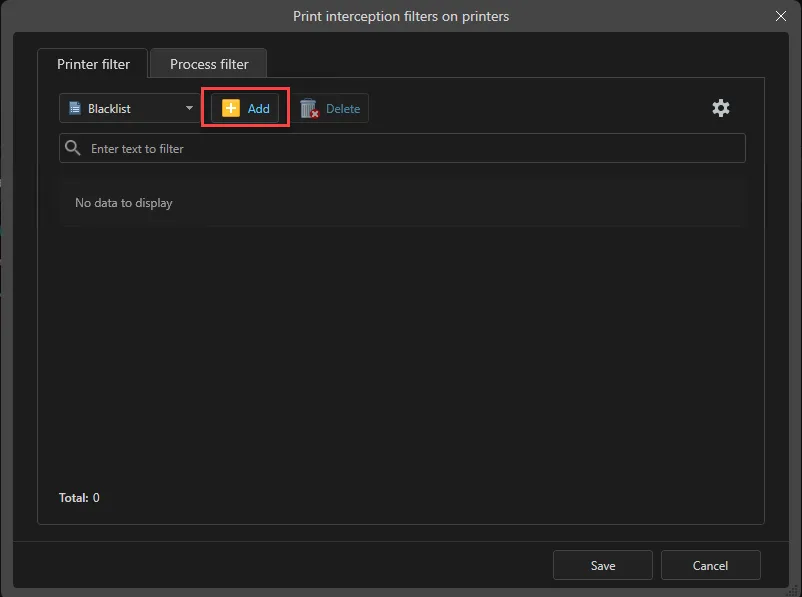
    Blocking policies can stop a print job that matches a rule before the document reaches the tray.

Coverage varies by operating system (Windows, Linux, macOS). Bluetooth transfer is analyzed and blocked by the same content rules as USB and clipboard, with intercepted files visible in the Client Console.

What Anexet Captures for Print Control

Anexet records the document content sent to the printer, the target printer's name and address, the employee account, and the exact moment the job was queued — for both local and network printers, giving your team a complete record for investigations.

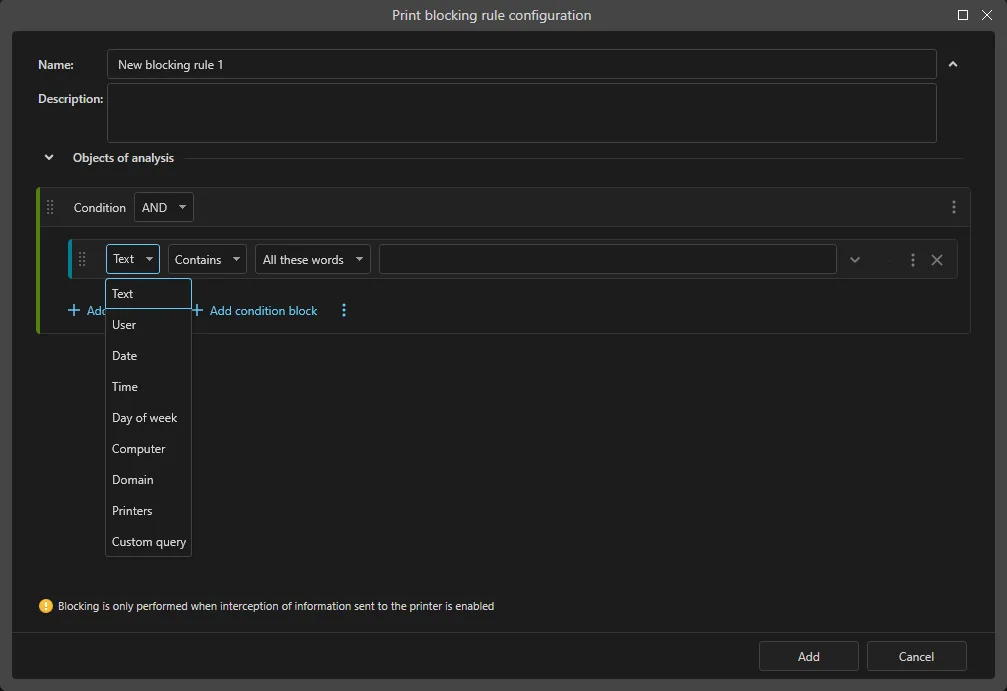
Because capture happens on the endpoint as the job is queued, no network tap is required. From the Advanced plan, policies can block a print job before the first page leaves the tray; with Premium, thesaurus-based content rules block a job by what the document itself contains.

Intercepted print job content in the Anexet Client Console
Print activity timeline tied to a user and printer

How Print Control Works

From a document queued for print to a controlled, searchable record.

A lightweight agent on the workstation intercepts a print job the instant it is queued — local and network printers are covered the same way.

1

Captured document content and job metadata are sent to your on-premise server and indexed for search.

2

From the Advanced plan, security policies scan the queued job in real time and can block it before the first page prints.

3

Analysts review print activity, investigate flagged jobs, and export evidence from the Client Console.

4

A lightweight agent on the workstation intercepts a print job the instant it is queued — local and network printers are covered the same way.

1

Captured document content and job metadata are sent to your on-premise server and indexed for search.

2

From the Advanced plan, security policies scan the queued job in real time and can block it before the first page prints.

3

Analysts review print activity, investigate flagged jobs, and export evidence from the Client Console.

4

Arrow

Print Control by Plan

StandardCore employee activity monitoring.
Network traffic interception
USB control
Printer monitoring
Messenger interception
Browser interception
and 4 more
Most popular
AdvancedAdds DLP and deeper visibility.
Standard plan included
DLP features
Network share monitoring
Keylogger
Webcam pictures
and 4 more
All-in-one
PremiumAll-in-one solution.
Standard + Advanced plans included
Advanced search (digital fingerprints, hash search)
File system monitoring
User relationship analysis
Risk analysis
and 6 more

Frequently Asked Questions

Common questions about how Anexet handles print monitoring and blocking.

Which plan includes print monitoring software?

Print capture — for both local and network printers — is included in every plan, starting with Standard. Every document sent to print is recorded with its content, the target printer, the user, and the timestamp.

Yes, from the Advanced plan. A blocking policy can stop a job the moment it matches a rule — by printer name, document name, user, or workstation. Content-aware blocking that matches a document's content against a thesaurus is part of Premium. The exact rule set for your environment is confirmed during the demo.

The document content itself, the name and address of the target printer, the employee account, and the exact time the job was queued — indexed and searchable in the Client Console.

Every captured print job and its content stays on your own servers: Anexet is deployed on-premise, and the vendor has no access to your data.

Blocking rules target specific criteria — printer name, document name, user, workstation, and thesaurus-based content matching — configured in the Administrator Console. Jobs that match no active rule print normally, so everyday business printing continues uninterrupted.

Three professionals collaborating and looking at a tablet in a meeting

Bring Workplace Printing Under Control

Tell us how your teams print and what you need to protect — we'll map it to the right plan and arrange a demo or a free trial.

I accept that my personal data can be processed in accordance with the Privacy Policy