Categories
Access Audit to sensitive data and Discretionary Access Control
 23
23 12 min
Unauthorised access to the company's information resources can lead to temporary or complete shutdown of production, destruction or leakage of confidential information and Personal Data of employees and customers, damage to equipment and realisation of other material and reputational risks. Access Audit to confidential data allows you to identify and eliminate vulnerabilities in the system of assigning rights. Read more in the material.
Let's break down the basic definitions and concepts.
Access Policy (hereinafter referred to as AP) — a document regulating access rights to data with which users are allowed to work.
Confidential Information (CI) it is any information that is proprietary or unique to the company and that is disclosed by the company to an employee during the term of this employment contract and the specified time after its expiration, including the following: trade secrets; matters of technical nature, such as processes, devices, methods, data and formulas, subjects and results of research; marketing methods; plans and strategies; information about operations, products, services, revenues, costs, profits, sales, keys, and other information about company's operations, products, services, revenues, costs, expenses, profits, sales, and other information..
A Security Policy (SP) is a document that outlines how a company plans to protect its physical and information technology assets.
Concept of Access Audit
The permit management system should be strictly regulated, especially if it is not automated. All granted and revoked permissions and requests should be logged. All valid accesses should be regularly checked for compliance with the established security policy.
It is important to recognise that even the most sophisticated rights management system should be subject to regular external and internal audits to identify inconsistencies and shortcomings.
Access Audit (hereinafter referred to as AA) is systematic process designed to ensure that individuals in an organisation have appropriate permissions for their positions to work on systems, services, applications and data.
There are two types of Access Audit: manual and automated audit using specialised software. Manual audit is more flexible, but it is not advisable for large enterprises, it will require a lot of time and resources.
Conducting an AA is necessary in order to:
- determine whether user rights correspond to assigned roles, narrow or expand the scope of authority for specific users and entire categories;
- identify facts of assigning excessive rights;
- detect unauthorised access to files and folders;
- update user rights when security policies are updated.
Systematic AA enables organisations to maintain Information Security at an appropriate level and comply with requirements described in international standards and regulatory acts of regulators.
In addition, the Audit identifies the following.
- Vulnerable accounts. That is, accounts that can be used for unauthorised access to the system and information accounts with weak passwords or multiple accounts in different services that use the same password. You can also detect such errors as infrequent password changes, duplicate accounts, etc.
- Superfluous and unrecorded accounts. Unlocked accounts of employees who have left the company or changed positions. This also includes technical accounts that have no real owners but have access rights to corporate systems, services, facilities and applications.
- Lack of entitlement regulations. The enterprise may not have the entitlement policy or a list of specific positions with specified entitlements, or access to them may be severely impeded.
Procedures for performing Access Audits
As a rule, the audit takes place in 5 stages. Let's consider them in detail.
Goal setting. In auditing, it is important to focus on specific areas of concern — that is, to set objectives. This ensures that the audit is thorough and effective, addresses critical aspects of user access management, and is not time-consuming.
Develop audit parameters and rules. Defining audit parameters, the time of audit, and amount of data to be examined: what user actions will be logged, logging parameters, and the size of files in which user actions are logged.
Approval and implementation of audit policies. Create a document that describes the general approach to auditing. For example, you can specify a list of the most important events to be logged. This will save disc space for data storage. It is also important to regulate the total amount of information that will be stored, the period of its storage and regulations for its destruction.
Identification of gaps and vulnerabilities. Identify and log excessive user access rights, unrecorded accounts, weak passwords, etc.
Maintain security logs and user activity records. Registration of all data on operations with files and folders containing CI.
Recorded events
Typically, following events are logged in the audit log:
- creating, deleting, moving, renaming files and folders;
- copying documents or information they contain;
- logging in and logging out of the system;
- launching services, software;
- reading confidential documents, copying to external media, printing.
Access auditing on Windows example
Windows supports the ability to perform such auditing.
Audit policy settings are largely driven by objectives, which may include compliance checking, monitoring, investigating after IS incidents, and correcting errors and deficiencies.
Let's take closer look at how AA works on Windows as an example.
Step
In the "Security Settings" section in the "Local Policies" directory, you need to configure the built-in and local SSs. The configuration is based on the audit goals and objectives.
Step
Configuring subjects. You can control not only individual users, but also entire groups, including departments or users with equal rights. You can also control built-in security subjects, such as accounts.
Step
Setting up objects. At the next stage of configuration, objects are defined, operations with which will be registered during the AA. These can be folders, files, documents, entire subdirectories, as well as individual events.
Step
Event classification. Windows events are categorised into subgroups according to the level of risk they pose to Information Security:
- critical;
- errors;
- information;
- warnings;
- details.
When the audit parameters are set, logbook will record any user operations on confidential files, including unsuccessful ones. If operation is performed and completed successfully, "success" will be displayed. If a user does not have sufficient rights to perform the operation, "failure" will be displayed.
AA can be carried out both on all workstations inside the corporate network and on individual computers, for example, those that process Personal data.
The security log is located in the "Computer Management folder". The amount of data about operations and events depends on auditing purposes and parameters set.
The Windows logbook does not provide tools to filter events, making it difficult to find specific incidents.
Common Access Control models
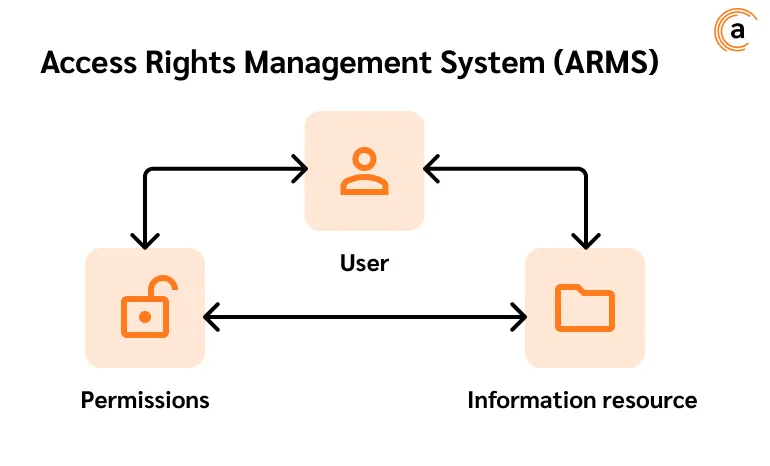
Access Rights Management System (ARMS) — is the set of hardware and software technical means and organisational measures aimed at controlling and restricting users' rights to access information, applications, resources and other objects in the computer system.
The main elements of the ARMS:
- users or accounts that are assigned rights with different levels of access;
- company resources, such as information systems, databases, applications, services, data protection tools, etc.;
- authorisations that users are granted within scope of their assigned permissions.
The use of access models for certain organisations is driven by legislation.
In order to optimise access rights processes, it is necessary to choose the right model. It is important to understand that implementing an access rights management system requires professional approach and compliance with all necessary security measures. For this purpose, it is better to contact specialists in the field of Information Security.
Next, let's look at the most popular access control models in detail.
Discretionary Access Control (DAC)
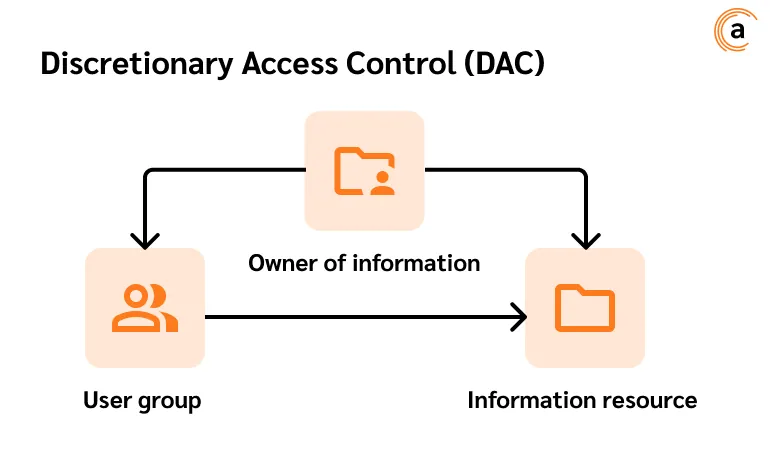
This is approach where information owners determine who can access a particular resource and at what times. It is based on the principle of least privilege: users will be granted exactly as many rights as they need to perform a particular work task.
The discretionary model is also referred to as the "selective" model.
The DAC mechanism is defined by user identification using credentials during authentication — username and password.
Different types of permissions can be applied individually or in combination — it all depends on who is granting them, for which resource and for what reason. Different types of access that can be granted under discretionary control include:
- granting other subjects or objects the same privileges that the subject has;
- the possibility to change the security attributes of objects, subjects, system components and information subjects;
- the possibility of transferring information to other subjects and objects;
- the possibility of selecting security attributes to be associated with new or modified objects;
- the possibility to modify access control rules.
DAC is characterised by the following attributes:
- a user may transfer ownership of object to another user(s);
- a user can define the access type of other users;
- after several unsuccessful authorisation attempts in the system, user's access will be blocked for some time;
- unauthorised users cannot see the object parameters: size, name and directory path.
DAC is simple to implement and intuitive, while having these disadvantages.
- Data is difficult to track. Since the system is not centralised, only way that administration can control the flow of data is to go through the access control list (ACL). This is only useful in the case of a small organisation with few employees.
- Compared to other governance models, DAC is more vulnerable in terms of Information Security. Since access can be granted from one person to another, sensitive data can be compromised.
DAC is more suited to smaller organisations.
Matrix control scheme
Control matrix is a table that defines access permissions that exist between certain subjects and objects of the information system. Columns usually contain objects (applications, databases, services, network, etc.), while the rows contain subjects (users or user groups). For each subject, the list of operations it can perform with objects is defined, for example:
- reading;
- deletion;
- creation;
- modification;
- copying;
- execution;
- transfer of rights.
It is advisable to categorise the lists of users and objects to save space.
These matrices can be rationally used in state institutions or enterprises working with personal data and confidential information, where there are groups of employees with access rights of different levels.
Permissions for user groups can be the same or different — depending on tasks to be performed — and must not cause conflicts of authority.
When using matrix control scheme, the principle of minimum privilege should be followed, i.e. granting the minimum sufficient level of authority necessary to fulfil work tasks.
Disadvantage of the matrix scheme is only one and that is the difficulty of organising centralised control.
Mandate Access Control model, or tagging model (MAC)
One of key differences between MAC and DAC is that MAC is considered the more secure model because individual users cannot change access to resources.
When using the credential model, objects (files, documents, databases, software, etc.) are assigned a label with the level of secrecy (e.g., "Trade Secret", "Publicly Available", "Secret", "Top Secret", "Of Special Importance") and subjects, or users, are assigned a label with the level of access.
The label model works according to the following principle: subject and object labels are checked for eligibility — the subject label must be equal to or higher than the object label. Otherwise, access to a confidential document is blocked or a user cannot see the document at all.
When a person or device attempts to obtain permission to work with a particular resource, the OS or security kernel will check the subject's credentials to determine if permission will be granted. While MAC is the most secure entitlement model available, it requires some focus of enterprise resources and constant monitoring to keep all subject and user classifications up to date.
Peculiarities and disadvantages of the mandate access scheme
Among others, the following features and disadvantages of the mandated access model stand out:
- users cannot define subjects' access to objects, even if they created them themselves — only an administrator has such rights;
- a user can work in session of only one mandate tag;
- MACs are difficult to maintain: manually configuring security levels and permissions requires constant attention from administrators;
- MAC does not scale automatically: new network members and data require constant updates to account configurations;
- significant benefit is that strict and constantly monitored policies help reduce the errors that lead to over-privileged users;
- the model is considered the least vulnerable to data breaches: employees cannot declassify information or share access to it.
MAC is one of the most secure models: access rules are manually defined by system administrators and strictly enforced by the operating system or security kernel.
Private organisations rarely implement MAC due to complexity and inflexibility of such system. MAC is often used by public institutions such as military, government organisations and law enforcement agencies. But that doesn't mean that private organisations don't need MAC, the well-implemented model provides a high and granular level of security despite being expensive and difficult to configure.
Role Based Management (RBM)
Role Based Management is used to give employees different levels of access depending on their positions and responsibilities. This significantly reduces the risk of sensitive data leakage — employees can access only information and perform only operations necessary to fulfil their work tasks. RBM offers simple, manageable management approach that is less prone to error than assigning permissions to users individually.
When using RBM for role management, an administrator analyses the needs of employees and groups them into roles based on responsibilities. Then assigns one or more roles to each employee and one or more permissions to each role. The relationships "user > role" and "role > permissions" simplify assignments because users no longer need to be managed individually, but instead have privileges that correspond to permissions assigned to their roles.
A role is the set of privileges. Roles are different from normal user groups. In the context of RBM, permissions are not directly related to a specific performer, but rather to his/her responsibilities, which is convenient. As a rule, there are always fewer roles than real employees, which simplifies the management of the information system.
Significant advantage of the RBM over other systems is that multiple roles can be activated for one person from a single device. In addition, the RBM allows you to:
- create the practical and user-friendly system for assigning authorisations;
- easily check privileges and correct identified violations;
- quickly add and modify roles;
- reduce likelihood of errors in assigning authorisations;
- integrate third-party users into the system by assigning them special roles;
- more effectively comply with regulatory and legal requirements regarding the confidentiality of sensitive information and personal data of employees and customers.
As in other Access Control models, in RBMs it is important to adhere to the principle of least privilege when assigning roles. No employee should be given more rights than he or she needs to perform work tasks.
Before implementing the RBM, the organisation should define the permissions for each role in as much detail as possible. This includes accurately defining authorisations in the following areas:
- to change the data;
- for reading;
- for copying or writing to external devices;
- to run applications and so on.
Implementation of the Access Control system
The implementation of any rights management system must be done at two levels: programmatic and organisational.
At the organisational level, it is important to develop a document that contains a list of users or groups of users, their roles or rights, and conditions for granting or revoking rights. In order to simplify the procedure for adjusting the list, it is advisable to make it separate annex to the main document.
What is important to specify in such a document?
- The owner of each information asset: employee, head of division, head of enterprise. The owner of information establishes rights without the possibility of transferring the rights to other persons.
- If the company is small, it is advisable to use a model in which only a superuser will have access administration rights.
- If a model is used where an entity can transfer rights to other entities, it is important to establish logbook and monitor.
As a side note, some organisations may use two or more management models at the same time, and specifics of use should be clearly described in regulations or security policy in place.
Implementing the rights management system involves several steps:
- Object Analysis. At this stage, goals and objectives of the system are defined, as well as requirements to it. Conduct survey of the information system, objects, identify vulnerabilities and assess possible risks. Determine the number of users, types of resources and other parameters.
- System Design. Develop system design, taking into account requirements of safety, usability and cost-effectiveness. The design should include description of the system structure, its components and functions, as well as plan for installation and configuration.
- Selection of hardware and software. Select hardware and software that meets to project requirements and budget. Hardware may include servers, network devices, authentication tools, and more. Software, in turn, allows you to manage the system, configure its parameters and receive reports on its operation.
- System installation and configuration. Perform hardware installation, software configuration and integration with other systems. Configure the system in accordance with the project and security requirements. Check system performance and troubleshoot possible problems.
- Personnel training. Train the employees responsible for the system on how to operate and maintain the system. Explain to them how to apply identifiers, how to grant and restrict rights, how to respond to security incidents, etc.
- System Audit. Conduct system testing for compliance with project requirements, reliability and security. Identify and correct errors and deficiencies.
- Commissioning of the system. After successful testing, the system is put into permanent operation. Support and maintenance are provided.
- Monitor and analyse system performance. Regularly monitor system operation, collect and analyse data on events and actions of performers. This allows to identify weaknesses, improve performance and increase the level of Information Security.
New requirements, threats or opportunities may arise during the operation of the system. It is necessary to carry out audits in a timely manner, on the basis of which changes to the system should be made to ensure that it meets current conditions as well as regulatory requirements. As a rule, an audit should be carried out at least once every 6 months.
In conclusion
Regular auditing of access to confidential data and rights segregation models is an important component of an enterprise's Information Security system. By developing and implementing the rights model that meets the needs and capabilities of the organisation, and by regularly auditing its performance, risks of leakage or destruction of commercial information and personal data of employees and customers can be significantly reduced.